AI writing carries a tell, choom. I built a free tool that strips it.
Ghostwriter is a free, open-source rig that makes AI-written text read like a real person typed it, stripping the hidden characters, the giveaway words, and the report-shaped structure that flag it as machine-made.
Paste something straight out of ChatGPT into an email, choom, and half the street can now clock it. Not because the facts are wrong. Because of how it reads. The word “delve” jacking in where no real person says “delve”. The tidy little three-item lists. Every sentence the same comfortable length as the last one. Once you clock the pattern a few times, you cannot un-clock it.
Ghostwriter strips that clean. It is a free, open-source rig I built at Starside, and you can grab it off GitHub right now. This post is the plain-street version of what it does and why you might want it in your kit.

Why does AI writing read like AI?
Because the models all jacked into the same habits. They reach for the same short list of flash-sounding words. They love a list of exactly three things. They punctuate with the long dash almost nobody types by hand. And they hide characters you cannot even see: invisible marks riding along in the text, quietly flagging it as machine-made, like a daemon tagging your work.
None of this is about smarts. A model can chrome up a genuinely good paragraph and still stamp it with all these tells. The tells are just habits, choom, and habits can be stripped.
The tricky part is they hide at different depths.
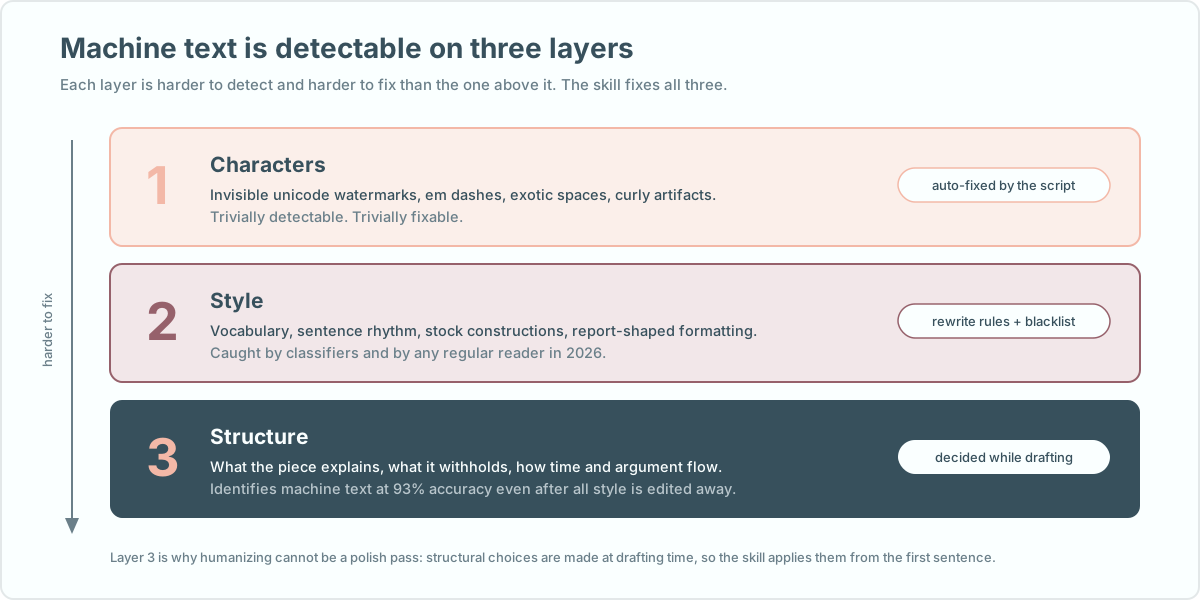
The top layer is the easy score. Hidden characters and long dashes are simple to find and delete once you know they are riding along. The middle layer is the words and the rhythm, the stuff a sharp reader clocks without being able to name it. The bottom layer is the sneaky one: it is not any single word, it is how the whole thing is built. Whether it explains its own point at the end. Whether every thread ties up too neat. Whether it names a real thing or waves vague at “a well-known example”.
That bottom layer is why you cannot just run AI text through a “make it human” button after the fact. By then the shape is already welded in. The fix has to happen while the text is being written, not after the render flatlines.
The tells, out in the open
Here are the ones you will start clocking everywhere once you know them.
Read the left column and the right column out loud. The right side is what a choom says to another choom without rehearsing it. That is the whole test Ghostwriter runs on every line.
Does it actually work?
Yeah, and I measured it instead of guessing. I ran AI-written text through ZeroGPT, one of the popular AI detectors, before and after.
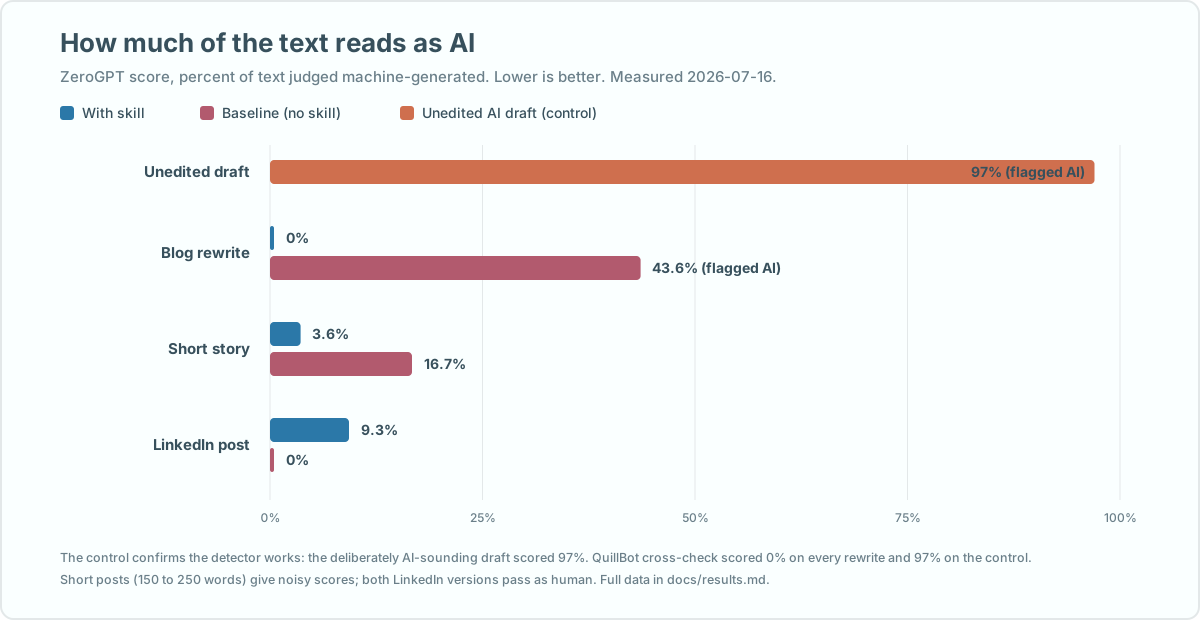
A raw AI blog draft came back flagged at 97% machine-written. The same content, rewritten with Ghostwriter, scored 0%. The detector called it human. I also ran it across three different Claude models against a plain “just don’t sound like AI” instruction, and the rig cleared nearly every check where the plain instruction kept sliding back into the old habits.
One straight caveat, choom: detectors are noisy, especially on short posts, and no rig makes weak writing good. Ghostwriter strips the machine fingerprint. It does not hand you something worth saying. That part is still on you.
Who is this for, and how do you grab it?
If you write anything public with AI help, a newsletter, a LinkedIn post, product copy, a cover letter, this is for you. You do not need to know how any of it works under the chrome. The one moving part you might touch is a small clean-up script that strips the invisible characters, and it runs itself when you use the rig.
It jacks into Claude and GitHub Copilot, both of which read tools from a shared folder, so installing it is copying one directory. The GitHub page has the exact steps, and it is free under an open licence with nothing to sign up for.
Then you just ask, in your own words: write this so it does not sound AI-generated. The rig does the rest, and keeps doing it from the first sentence instead of trying to paint over the cracks at the end.
If you want the background on why AI text reads the way it does, that ties into a couple of things I have written before: how to spot AI slop in the first place, and why editing your prompts matters more than clever wording. Ghostwriter handles the last mile, so the good stuff you wrote does not get mistaken for a machine’s. Preem.